2026-04
2026-04-29 Thursday 🌐 🎬 💾 📚 📑 🔬
Open Notebook
An open source, privacy-focused alternative to Google's Notebook LM!
PREESM (the Parallel and Real-time Embedded Executives Scheduling Method)
PREESM (the Parallel and Real-time Embedded Executives Scheduling Method) is an open source rapid prototyping and code generation tool. It is primarily employed to simulate signal processing applications and generate code for multi-core Digital Signal Processors. PREESM is developed at the Institute of Electronics and Telecommunications-Rennes (IETR) in collaboration with Texas Instruments France in Nice.
PICO DSP Lib
💾DSPi
DSPi transforms a Raspberry Pi Pico or other RP2040-based board into a very competent and inexpensive little digital audio processor. It acts as a USB sound card with an onboard DSP engine, allowing you to make use of essential tools like room correction, active crossovers, parametric EQ, time alignment, loudness compensation, and headphone crossfeed.
DESIGN.md
A format specification for describing a visual identity to coding agents. DESIGN.md gives agents a persistent, structured understanding of a design system.
Gemma 4 FPGA Artifact Bundle
This repository contains a reproducible deployment bundle for running Gemma-based inference on a Xilinx Kria KV260 FPGA.
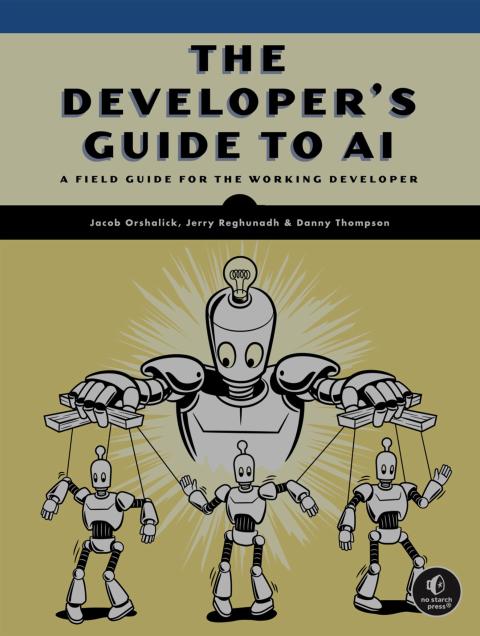
The Developer's Guide to AI
2026-023
2026-04-29 Wednesday 🌐 🎬 💾 📚 📑 🔬
PICO Cluster
2026-04-28 Tuesday 🌐 🎬 💾 📚 📑 🔬
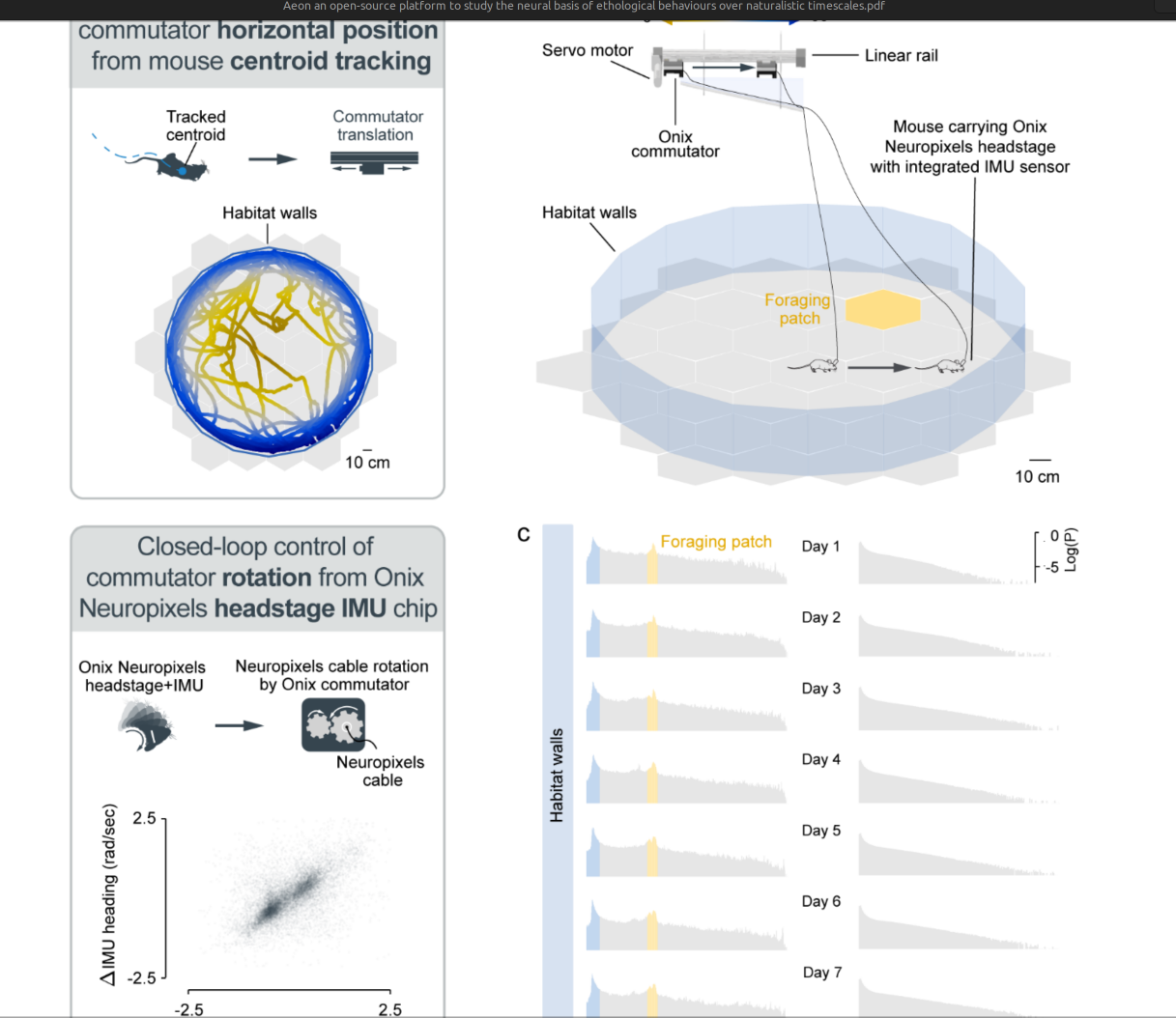
Aeon: an open-source platform to study the neural basis of ethological behaviours over naturalistic timescales (UCL)
2026-04-27 Monday 🌐 🎬 💾 📚 📑 🔬
Keypoint MoSeq
Motion Sequencing (MoSeq) is an unsupervised machine learning method for animal behavior analysis. Given behavioral recordings, MoSeq learns a set of stereotyped movement patterns and when they occur over time. This package provides tools for fitting a MoSeq model to keypoint tracking data and analyzing the results.
The Brain, In Theory

2026-022
2026-04-24 Friday 🌐 🎬 💾 📚 📑 🔬
Streamlit
Streamlit lets you transform Python scripts into interactive web apps in minutes, instead of weeks. Build dashboards, generate reports, or create chat apps. Once you’ve created an app, you can use our Community Cloud platform to deploy, manage, and share your app.
MIPI on Gatemate
This repository contains the schematic and layout for a prototype evaluation board for the Cologne Chip Gatemate FPGA and the Verilog source of a MIPI-CSI-2-HDMI-bridge. The evaluation board is designed to enable the use of a Raspberry Pi Camera V2 for receiving and an HDMI port for transmitting video data, however it may be useful to make some adjustments to the design.
About Fluorescence intensity
In fiber photometry studies, the fluorescence intensity of normal brain tissue (often expressing calcium indicators like GCaMP or neurotransmitter sensors) is typically measured in the range of 20 to 60 uW at the tip of the fiber for excitation. While this represents the input power, the emitted detected signal intensity is significantly lower and varies based on the expression level of the sensor.
Optimal Excitation Power: The generally recommended range for laser or LED power at the ferrule end of the patch cable is between 25uW and 100uW, with 20–60uW often cited for optimal signal-to-noise ratio without excessive photobleaching.
Impact of High Intensity: Setting the power too high (e.g., >100uW) can lead to significant photobleaching of the fluorescent sensors.
Alchitry FPGA Board Company
2026-04-23 Thursday 🌐 🎬 💾 📚 📑 🔬
OpenCV Mipi Camera GrayScale 12Bits IMX 287 for Fiber Photometry
import cv2
import ctypes
import tkinter as tk
from threading import Thread
import time
import numpy as np
import random
import matplotlib.pyplot as plt
from matplotlib.backends.backend_tkagg import FigureCanvasTkAgg
from PIL import Image, ImageTk

def get_circle_indices(cx, cy, r, width=160, height=120):
   indices = []

   # Define the bounding box of the circle to avoid checking every pixel in the image
   x_start = max(0, int(cx - r))
   x_end = min(width, int(cx + r + 1))
   y_start = max(0, int(cy - r))
   y_end = min(height, int(cy + r + 1))

   r_squared = r**2

   for y in range(y_start, y_end):
       for x in range(x_start, x_end):
           # Check if the pixel is inside or on the boundary of the circle
           if (x - cx)**2 + (y - cy)**2 <= r_squared:
               indices.append((x, y))

   return indices

def cal_bright(image, points):
   sum = 0
   for p in points:
       sum += ctypes.c_int32(image[p]).value
       #print(p,sum,image[p])
   #print(sum)
   return (sum/len(points))

class LiveMonitor:
   def __init__(self, root):
       # v4l2-ctl -d /dev/video0 --set-fmt-video=width=720,height=540,pixelformat='Y12 '

       self.camera = cv2.VideoCapture(0, cv2.CAP_V4L2)
       self.camera.set(cv2.CAP_PROP_CONVERT_RGB, 0)
       #self.camera.set(cv2.CAP_PROP_FOURCC, cv2.VideoWriter_fourcc(*'Y12 '))


       # Example: Center (80, 60) with radius 30
       self.circle_points = get_circle_indices(cx=80, cy=60, r=10)

       print(f"Total points found: {len(self.circle_points)}")
       print(self.circle_points[100:110])

       self.root = root
       self.root.title("200 Point Monitor")

       # State control
       self.is_running = True
       self.data = []
       self.max_points = 200 # Updated limit

       # UI Setup: Plot Area
       self.fig, self.ax = plt.subplots(figsize=(6, 4), dpi=100)
       self.line, = self.ax.plot([], [], color='#3498db', linewidth=1.5)
       self.ax.set_ylim(240, 300)
       self.ax.set_xlim(0, self.max_points)
       self.ax.grid(True, linestyle='--', alpha=0.5)

       self.canvas = FigureCanvasTkAgg(self.fig, master=self.root)
       self.canvas.get_tk_widget().pack(padx=10, pady=10, fill=tk.BOTH, expand=True)

       self.vcanvas = tk.Canvas(root, width=160, height=120)
       self.vcanvas.pack()

       # UI Setup: Quit Button
       self.quit_btn = tk.Button(
           self.root, text="Quit Application",
           command=self.on_close, bg="#e74c3c", fg="white",
           font=("Arial", 10, "bold"), pady=5
       )
       self.quit_btn.pack(pady=10)

       # Handle window 'X' button
       self.root.protocol("WM_DELETE_WINDOW", self.on_close)

       # Execution
       self.data_thread = Thread(target=self.data_provider, daemon=True)
       self.data_thread.start()
       self.update_plot()

   def data_provider(self):
       """Simulates 10Hz data stream."""
       while self.is_running:
           new_val =self.fp()
           #new_val = random.randint(20, 80)
           self.data.append(new_val)
           if len(self.data) > self.max_points:
               self.data.pop(0)
           #time.sleep(0.1)

   def update_plot(self):
       """Main thread GUI refresh."""
       if self.is_running:
           if self.data:
               self.line.set_ydata(self.data)
               self.line.set_xdata(range(len(self.data)))
               d_min, d_max = np.min(self.data), np.max(self.data)
               margin = max((d_max - d_min) * 0.1, 1.0)
               self.ax.set_ylim(d_min - margin, d_max + margin)
               self.canvas.draw_idle()
           # Schedule next update in 50ms for smoother visual flow
           self.root.after(10, self.update_plot)

   def on_close(self):
       """Ensures the thread stops before the window is destroyed."""
       self.is_running = False
       self.root.quit()
       self.root.destroy()

   def update_video(self, frame):
       frame8 = (frame / 16).astype(np.uint8)
       #cframe = cv2.merge([frame, frame, frame])
       cframe = cv2.cvtColor(frame8, cv2.COLOR_GRAY2RGB)
       cv2.circle(cframe, (80,60), 10, (255,0,0), 1)

       img = Image.fromarray(cframe)
       self.photo = ImageTk.PhotoImage(img)
       self.vcanvas.create_image(0,0, image=self.photo, anchor=tk.NW)

   def fp(self):
       ret,frame = self.camera.read()

       self.rframe = cv2.resize(frame, None, fx=0.25, fy=0.25, interpolation=cv2.INTER_AREA)

       #print("=======")
       tb = cal_bright(self.rframe, self.circle_points)
       #print(tb)
       self.root.after(0, self.update_video, self.rframe)

       time.sleep(0.1)
       return tb


#pipeline = "v4l2src device=/dev/video0 ! video/x-raw, format=GRAY16_LE ! videoconvert ! appsink"
#camera = cv2.VideoCapture(pipeline, cv2.CAP_GSTREAMER)


if __name__ == "__main__":
   root = tk.Tk()
   app = LiveMonitor(root)
   root.mainloop()
StarLogo
StarLogo TNG is a downloadable programming environment that lets students and teachers create 3D games and simulations for understanding complex systems.
ESP32 UVC Camera and Stream
💾ESP32-P4 UVC Webcam + RTSP IP Camera
USB Video Class 1.5 webcam and RTSP/RTP IP camera running on the ESP32-P4 with an OV5647 sensor. Supports simultaneous USB and Ethernet streaming.
Dynamic Range Plot
   def update_plot_loop(self):
       if self.is_running:
           for i in range(len(self.current_keys)):
               self.lines[i].set_ydata(self.data[i])
           d_min, d_max = np.min(self.data), np.max(self.data)
           margin = max((d_max - d_min) * 0.1, 1.0)
           self.ax.set_ylim(d_min - margin, d_max + margin)
           self.canvas.draw_idle()
       self._after_id = self.root.after(50, self.update_plot_loop)
2026-04-22 Wednesday 🌐 🎬 💾 📚 📑 🔬
Plot
import tkinter as tk
from threading import Thread
import time
import random
import matplotlib.pyplot as plt
from matplotlib.backends.backend_tkagg import FigureCanvasTkAgg

class LiveMonitor:
    def __init__(self, root):
        self.root = root
        self.root.title("200 Point Monitor")

        # State control
        self.is_running = True
        self.data = []
        self.max_points = 200 # Updated limit

        # UI Setup: Plot Area
        self.fig, self.ax = plt.subplots(figsize=(6, 4), dpi=100)
        self.line, = self.ax.plot([], [], color='#3498db', linewidth=1.5)
        self.ax.set_ylim(0, 100)
        self.ax.set_xlim(0, self.max_points)
        self.ax.grid(True, linestyle='--', alpha=0.5)

        self.canvas = FigureCanvasTkAgg(self.fig, master=self.root)
        self.canvas.get_tk_widget().pack(padx=10, pady=10, fill=tk.BOTH, expand=True)

        # UI Setup: Quit Button
        self.quit_btn = tk.Button(
            self.root, text="Quit Application",
            command=self.on_close, bg="#e74c3c", fg="white",
            font=("Arial", 10, "bold"), pady=5
        )
        self.quit_btn.pack(pady=10)

        # Handle window 'X' button
        self.root.protocol("WM_DELETE_WINDOW", self.on_close)

        # Execution
        self.data_thread = Thread(target=self.data_provider, daemon=True)
        self.data_thread.start()
        self.update_plot()

    def data_provider(self):
        """Simulates 10Hz data stream."""
        while self.is_running:
            new_val = random.randint(20, 80)
            self.data.append(new_val)
            if len(self.data) > self.max_points:
                self.data.pop(0)
            time.sleep(0.1)

    def update_plot(self):
        """Main thread GUI refresh."""
        if self.is_running:
            if self.data:
                self.line.set_ydata(self.data)
                self.line.set_xdata(range(len(self.data)))
                self.canvas.draw_idle()
            # Schedule next update in 50ms for smoother visual flow
            self.root.after(50, self.update_plot)

    def on_close(self):
        """Ensures the thread stops before the window is destroyed."""
        self.is_running = False
        self.root.quit()
        self.root.destroy()

if __name__ == "__main__":
    root = tk.Tk()
    app = LiveMonitor(root)
    root.mainloop()
PandA Bambu HLS Framework
2026-04-21 Tuesday 🌐 🎬 💾 📚 📑 🔬
TFT_eSPI Plot use Arduino
#include <SPI.h>
#include <SD.h>
#include <TFT_eSPI.h>       // Hardware-specific library
#include <pico/stdlib.h>
#include <hardware/gpio.h>
#include "i2ckbd.h"


TFT_eSPI tft = TFT_eSPI();  // Invoke custom library
TFT_eSprite img = TFT_eSprite(&tft); // Sprite for flicker-free updates

#define SCREEN_WIDTH 320
#define SCREEN_HEIGHT 320

const uint LEDPIN = 25;

#define PLOT_WIDTH 240
#define PLOT_HEIGHT 240

int v1[PLOT_WIDTH]; // Ring buffer
int v2[PLOT_WIDTH]; // Ring buffer
int head = 0;           // Current write position

void setup() {
  Serial.begin(115200);
  randomSeed(1024);

  tft.init();
  //tft.setRotation(1);
  tft.fillScreen(TFT_BLACK);
  tft.invertDisplay( true );

  delay(1000);

  img.createSprite(PLOT_WIDTH, PLOT_HEIGHT); // Create a sprite for the graph area

  gpio_init(LEDPIN);
  gpio_set_dir(LEDPIN,GPIO_OUT);
  gpio_put(LEDPIN,1);
  sleep_ms(5000);
  gpio_put(LEDPIN,0);

  init_i2c_kbd();
}

unsigned long ts = 0;
unsigned long td = 0;

void loop() {
  ts = micros();

  // 1. Add new sample to ring buffer
  v1[head] = random(2048, 4096)/20;
  v2[head] = random(0, 2048)/20;

  // 2. Clear sprite
  img.fillSprite(TFT_BLACK);

  // 3. Draw signal by iterating from the oldest to newest point
  for (int i = 1; i < PLOT_WIDTH; i++) {
    // Calculate indices using modulo for "wrap around"
    int i0 = (head + i) % PLOT_WIDTH;
    int i1 = (head + i + 1) % PLOT_WIDTH;

    // Draw the line segment
    img.drawLine(i - 1, PLOT_HEIGHT - v1[i0], i, PLOT_HEIGHT - v1[i1], TFT_GREEN);
    img.drawLine(i - 1, PLOT_HEIGHT - v2[i0], i, PLOT_HEIGHT - v2[i1], TFT_RED);
  }

  // 4. Move head to the next position
  head = (head + 1) % PLOT_WIDTH;

  // 3. Push to screen at specific coordinates
  img.pushSprite(0, 50);
  // Drawing 10ms
  td = micros() - ts;
  Serial.println(td);
}
DeepBlue Embedded, Maybe a Outsource
Pico DirtyJTag
For OpenFPGALoader
MCU SWD
Picocalc Micropython
How to use TFT_eSPI Driver in Arduino
Under TFT_eSPI Folder
Change User_Setup_Select.h
UnMark the desired include xxxx.h <--- inside User_Setups Folder
Ants and Brain
🌐An ant colony has memories that its individual members don’t have
🌐Ants vs. Humans: Putting Group Smarts to the Test
🌐Ant colonies behave like neural networks when making decisions
2026-04-20 Monday 🌐 🎬 💾 📚 📑 🔬
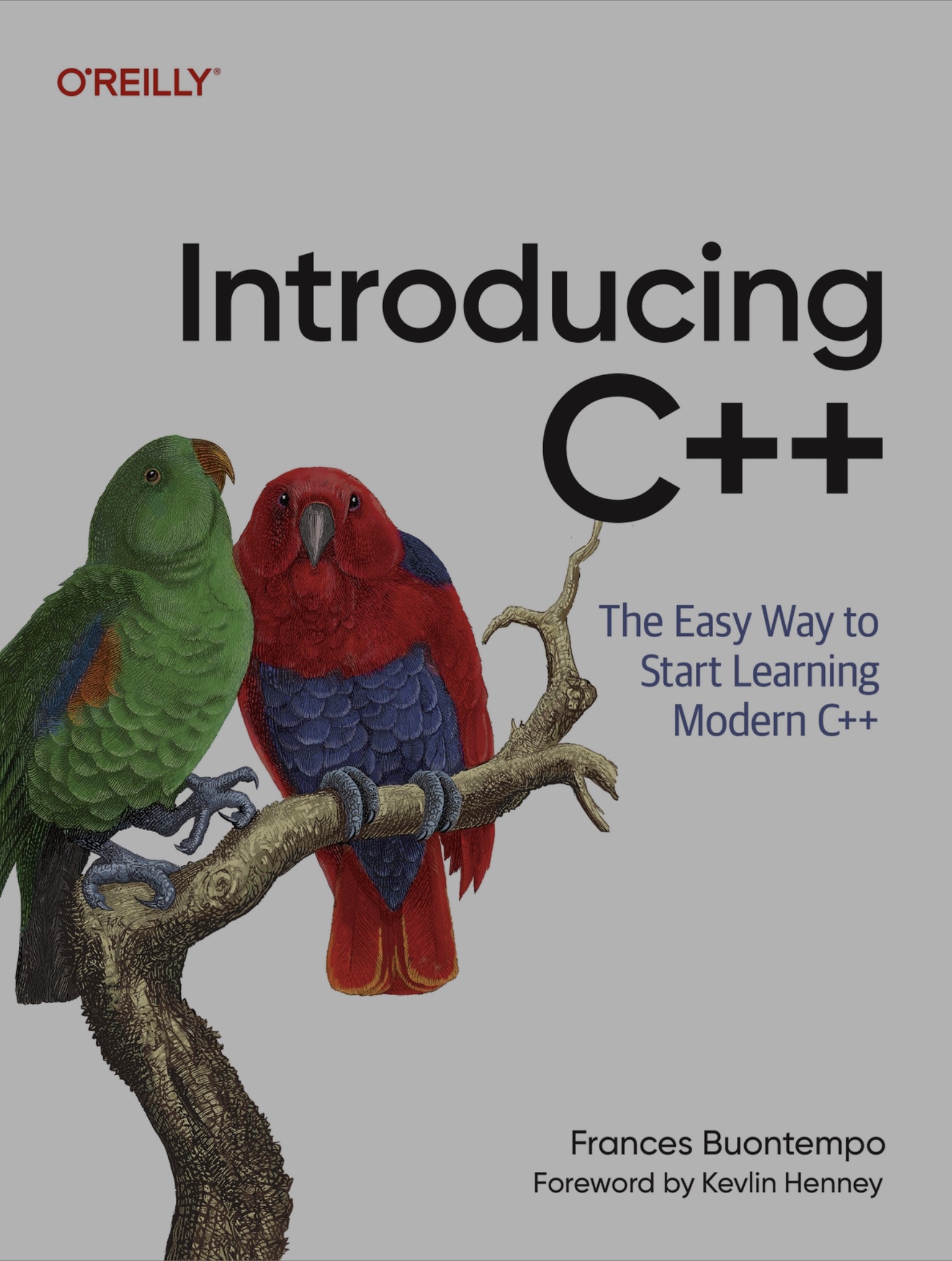
Introduction C++
2026-021
Python guicmd.py
import tkinter as tk
from tkinter.scrolledtext import ScrolledText
import subprocess
import json
import threading
import signal
import os

# JSON Configuration
json_config = """
[
    {"name": "Ping Google", "cmd": "ping 8.8.8.8"},
    {"name": "Watch Memory", "cmd": "top -b -d 1"},
    {"name": "System Info", "cmd": "uname -a"},
    {"name": "Disk Usage", "cmd": "df -h"}
]
"""

class CommandDashboard:
    def __init__(self, root):
        self.root = root
        self.root.title("Command Dashboard (Font 16)")
        self.root.geometry("800x600")
        self.current_process = None
        self.setup_ui()

    def setup_ui(self):
        btn_frame = tk.Frame(self.root)
        btn_frame.pack(pady=10)

        buttons_data = json.loads(json_config)
        for item in buttons_data:
            tk.Button(
                btn_frame, text=item["name"],
                command=lambda c=item["cmd"]: self.start_new_command(c),
                width=15
            ).pack(side=tk.LEFT, padx=5)

        # UPDATED: Font size set to 16
        # Reference: https://www.geeksforgeeks.org/python/python-tkinter-scrolledtext-widget/
        self.output_display = ScrolledText(
            self.root,
            bg="black",
            fg="#00FF00",
            font=("Courier", 16)  # <-- Changed here
        )
        self.output_display.pack(padx=10, pady=10, fill=tk.BOTH, expand=True)

        ctrl_frame = tk.Frame(self.root)
        ctrl_frame.pack(pady=10)

        tk.Button(ctrl_frame, text="STOP", fg="white", bg="red", width=10, command=self.kill_current).pack(side=tk.LEFT, padx=5)
        tk.Button(ctrl_frame, text="CLEAR", bg="gray", width=10, command=lambda: self.output_display.delete('1.0', tk.END)).pack(side=tk.LEFT, padx=5)

    def kill_current(self):
        if self.current_process and self.current_process.poll() is None:
            try:
                os.killpg(os.getpgid(self.current_process.pid), signal.SIGTERM)
                self.output_display.insert(tk.END, "\n[PREVIOUS PROCESS KILLED]\n")
            except:
                self.current_process.kill()
            self.current_process = None

    def start_new_command(self, cmd):
        self.kill_current()
        self.output_display.insert(tk.END, f"\n>>> Launching: {cmd}\n")
        thread = threading.Thread(target=self.execute_logic, args=(cmd,), daemon=True)
        thread.start()

    def execute_logic(self, cmd):
        try:
            self.current_process = subprocess.Popen(
                cmd, shell=True, stdout=subprocess.PIPE, stderr=subprocess.STDOUT,
                text=True, preexec_fn=os.setsid
            )
            for line in self.current_process.stdout:
                if self.current_process:
                    self.output_display.insert(tk.END, line)
                    self.output_display.see(tk.END)
            self.current_process.wait()
        except Exception as e:
            if self.current_process:
                self.output_display.insert(tk.END, f"Error: {str(e)}\n")

if __name__ == "__main__":
    root = tk.Tk()
    app = CommandDashboard(root)
    root.mainloop()
2026-04-17 Friday 🌐 🎬 💾 📚 📑 🔬
Assorted library of utility cores for amaranth HDL.
Python Run Text as Code Blocks
2026-04-16 Thursday 🌐 🎬 💾 📚 📑 🔬
Cynthion USB2 Hack Tool
Cynthion is an all-in-one tool for building, testing, monitoring, and experimenting with USB devices.
Litex Ethernet Support PTP
LiteEth provides a small footprint and configurable Ethernet core.
LiteEth is part of LiteX libraries whose aims are to lower entry level of complex FPGA cores by providing simple, elegant and efficient implementations of components used in today's SoC such as Ethernet, SATA, PCIe, SDRAM Controller...
Using Migen to describe the HDL allows the core to be highly and easily configurable.
LiteEth can be used as LiteX library or can be integrated with your standard design flow by generating the verilog rtl that you will use as a standard core.
Litex Support White Rabbit
💾Litex White Rabbit NIC and PCIE
This project implements a LiteX-based White Rabbit NIC, combining networking and synchronization features with support for PCIe Precision Time Measurement (PTM). The design enables White Rabbit (WR) synchronization to be propagated to the host and other PTM-compatible systems while providing 1Gbps Ethernet functionality.
2026-04-15 Wednesday 🌐 🎬 💾 📚 📑 🔬
Think Different Apple ad,
HLS4ML : FPGA for ML
A package for machine learning inference in FPGAs. We create firmware implementations of machine learning algorithms using high level synthesis language (HLS). We translate traditional open-source machine learning package models into HLS that can be configured for your use-case!
hls4ml is designed for ultra-low-latency inference on FPGAs. While it has strong roots in high-energy physics applications (e.g., L1 trigger systems at the CERN Large Hadron Collider), it has also been adopted across diverse scientific and industrial domains. Example use cases include control systems for quantum computing, feedback loops in nuclear fusion, low-power environmental monitoring on satellites, and biomedical signal processing (e.g., arrhythmia classification).
SCI-Compiler FPGA Graphic Compiler

ULX5M-GS
The Art Of Computer Programming
Working Through 001: The Art Of Computer Programming
Hog: HDL on git
📑Hog
Hog addresses these challenges by leveraging advanced git features and integrating with HDL IDEs: Xilinx Vivado, Xilinx ISE (PlanAhead)[1], Intel Quartus[2], Microchip Libero[3], and Lattice Diamond[3]. Hog also supports the open-source VHDL simulator GHDL. Integration with these tools aims to minimize unnecessary overhead for developers.
2026-04-14 Tuesday 🌐 🎬 💾 📚 📑 🔬
Mermaid Use Markdown to Draw Graphics
Mermaid Test 1
graph TD;
    A-->B;
    A-->C;
    B-->D;
    C-->D;
Mermaid Test 2
graph LR
  A[Start] --> B{Error?};
  B -->|Yes| C[Hmm...];
  C --> D[Debug];
  D --> B;
  B ---->|No| E[Yay!];
Mermaid Test 3
sequenceDiagram
  autonumber
  Alice->>John: Hello John, how are you?
  loop Healthcheck
      John->>John: Fight against hypochondria
  end
  Note right of John: Rational thoughts!
  John-->>Alice: Great!
  John->>Bob: How about you?
  Bob-->>John: Jolly good!
【薩爾達傳說】重要地點全地圖一覽
Collection of Hyperdimensional Computing Projects
📑Collection of Hyperdimensional Computing Projects
Yosys on web through Web Assembly
YoWASP (Yosys WebAssembly Synthesis & PnR) is a project that aims to distribute up-to-date FOSS FPGA tools compiled to WebAssembly via language package managers like Python’s PyPI and JavaScript’s NPM.
NextPNR Support Device
- Lattice iCE40 devices supported by Project IceStorm
- Lattice ECP5 devices supported by Project Trellis
- Lattice Nexus devices supported by Project Oxide
- Gowin LittleBee and Aurora V devices supported by Project Apicula
- NanoXplore NG-Ultra devices supported by Project Beyond
- Cologne Chip GateMate devices supported by Project Peppercorn
- (experimental) Cyclone V devices supported by Mistral
- (experimental) Lattice MachXO2 devices supported by Project Trellis
- (experimental) Xilinx 7-series devices supported by Project X-Ray
- (experimental) a "generic" back-end for user-defined architectures
Dr. Jane Goodall’s Final Message To The World
🎬Dr. Jane Goodall’s Final Message To The World
In the place where I am now, I look back over my life. I look back at the world I’ve left behind. What message do I want to leave? I want to make sure that you all understand that each and every one of you has a role to play. You may not know it, you may not find it, but your life matters, and you are here for a reason.
And I just hope that reason will become apparent as you live through your life. I want you to know that, whether or not you find that role that you’re supposed to play, your life does matter, and that every single day you live, you make a difference in the world. And you get to choose the difference that you make.
I want you to understand that we are part of the natural world. And even today, when the planet is dark, there still is hope. Don’t lose hope. If you lose hope, you become apathetic and do nothing. And if you want to save what is still beautiful in this world – if you want to save the planet for the future generations, your grandchildren, their grandchildren – then think about the actions you take each day.
Because, multiplied a million, a billion times, even small actions will make for great change. I want to – I just hope that you understand that this life on Planet Earth isn’t the end. I believe, and now I know, that there is life beyond death. That consciousness survives.
I can’t tell you, from where I am, secrets that are not mine to share. I can’t tell you what you will find when you leave Planet Earth. But I want you to know that your life on Planet Earth will make some difference in the kind of life you find after you die.
Above all, I want you to think about the fact that we are part – when we’re on Planet Earth – we are part of Mother Nature. We depend on Mother Nature for clean air, for water, for food, for clothing, for everything. And as we destroy one ecosystem after another, as we create worse climate change, worse loss of diversity, we have to do everything in our power to make the world a better place for the children alive today, and for those that will follow.
You have it in your power to make a difference. Don’t give up. There is a future for you. Do your best while you’re still on this beautiful Planet Earth that I look down upon from where I am now.
God bless you all.
No one want to die in Iran for Trump
Aegis is a fully open-source FPGA, from the silicon up
Open-source FPGA efforts have made huge strides: projects like Project IceStorm and Apicula reverse-engineer proprietary bitstream formats, OpenFPGA and FABulous generate open FPGA fabric from architecture descriptions, and Cologne Chip's GateMate ships a commercial FPGA with a fully open-source toolchain. Where these projects each tackle a piece of the puzzle, Aegis is a full-stack, end-to-end open-source FPGA: fabric generation, synthesis, place-and-route, bitstream packing, simulation, and tapeout all live in one project, designed from the ground up for open source. From HDL to GDS, nothing is behind a proprietary wall.
2026-04-13 Monday 🌐 🎬 💾 📚 📑 🔬
WinBoat : Run Windows App on Linux
2026-04-10 Friday 🌐 🎬 💾 📚 📑 🔬
DSP by FPGA with Scilab filter designer
💾DSP by FPGA with Scilab filter designer
Cmod A7 driven ADC10065 & MAX5183. 10-bits 50 Msps Analog/Digital Processor. Input 1ch, Output 4ch. Including Delta-Sigma ADC&DAC. Related book (Japanese) is available from https://ghz-ws.booth.pm/items/7271269
Romain Brette Theoretical Neuroscience
🌐Romain Brette's Web Page and Blog
Author of "The Brain, In Theory"
Terra A1 : Drone Intercepter from Japan

2026-04-09 Thursday 🌐 🎬 💾 📚 📑 🔬
以色列轟黎巴嫩釀250死 搜救持續進行
真不知道誰才是恐怖國家
Daily Review
- 今日失敗的事
- 今日感動的事
- 明日的目標
PICO Set Clock
-
Set Specific Speed: Use set_sys_clock_khz(khz, true) to change the system clock.
-
Restore set_sys_clock_khz(125000, true) restores default speed.
-
Minimum Stable Speed: set_sys_clock_khz(10000, true) (10 MHz) is a safe low-speed option.
Program Generate from Google AI about 30-45min iteration
import tkinter as tk
from tkinter import ttk, messagebox, scrolledtext
import serial
import serial.tools.list_ports
import json
import threading
import numpy as np
import matplotlib.pyplot as plt
from matplotlib.backends.backend_tkagg import FigureCanvasTkAgg
import csv
import queue
from datetime import datetime

# ==========================================================
# CUSTOMIZE YOUR SETTINGS HERE
# ==========================================================
BUTTON_CONFIG = [
    {"text": "Status", "cmd": {"status": 1}},
    {"text": "Speed 100",  "cmd": {"speed": 2}},
    {"text": "Speed 150",  "cmd": {"speed": 3}},
    {"text": "Speed 200",  "cmd": {"speed": 4}},
    {"text": "Speed 250",  "cmd": {"speed": 5}},
    {"text": "TWIST1", "cmd": {"TWIST_MODE": 1}},
    {"text": "TWIST2",  "cmd": {"TWIST_MODE2": 1}},
    {"text": "PC Control", "cmd": {"CMD_MODE": 1}},
    {"text": "Disable to USB", "cmd": {"send_to_usb": 0}},
    {"text": "Enable to USB",  "cmd": {"send_to_usb": 1}},
]

DATA_GROUPS = {
    "Group 1 (Quaternion)": ["qw", "qx", "qy", "qz"],
    "Group 2 (Accel)": ["ax", "ay", "az"],
    "Group 3 (Gyro)": ["gx", "gy", "gz"]
}

ALL_CSV_KEYS = sorted(list(set([key for group in DATA_GROUPS.values() for key in group])))

# ==========================================================

class UARTApp:
    def __init__(self, root):
        self.root = root
        self.root.title("UART JSON Controller - Pro Edition")

        self.max_pts = 200
        self.group_names = list(DATA_GROUPS.keys())
        self.current_group_name = self.group_names[0]
        self.current_keys = DATA_GROUPS[self.current_group_name]

        self.init_data_buffer()

        self.ser = None
        self.is_running = False
        self._after_id = None

        self.csv_queue = queue.Queue()
        self.save_enabled = tk.BooleanVar(value=False)
        self.log_filename = ""

        self.setup_ui()
        self.update_plot_loop()

    def init_data_buffer(self):
        num_keys = len(self.current_keys)
        self.data = np.zeros((num_keys, self.max_pts), dtype=np.float64)
        self.x_axis = np.arange(self.max_pts, dtype=np.int32)

    def setup_ui(self):
        # --- Top: Connection ---
        top_frame = ttk.Frame(self.root)
        top_frame.pack(side="top", fill="x", padx=10, pady=5)

        ttk.Label(top_frame, text="Port:").pack(side="left")
        self.port_cb = ttk.Combobox(top_frame, width=15)
        self.refresh_ports()
        self.port_cb.pack(side="left", padx=5)
        ttk.Button(top_frame, text="Refresh", command=self.refresh_ports, width=8).pack(side="left")

        self.btn_conn = ttk.Button(top_frame, text="Connect", command=self.toggle_serial)
        self.btn_conn.pack(side="left", padx=10)

        self.chk_save = ttk.Checkbutton(top_frame, text="Enable Saving (CSV)", variable=self.save_enabled)
        self.chk_save.pack(side="left", padx=5)

        self.log_status_lbl = ttk.Label(top_frame, text="Status: Idle", foreground="gray")
        self.log_status_lbl.pack(side="left", padx=10)

        ttk.Button(top_frame, text="Quit Program", command=self.quit_program).pack(side="right")

        # --- Main Layout ---
        main_paned = ttk.Panedwindow(self.root, orient="horizontal")
        main_paned.pack(fill="both", expand=True, padx=10, pady=5)

        # --- Left Panel ---
        left_panel = ttk.Frame(main_paned)
        main_paned.add(left_panel, weight=3)

        btn_grid = ttk.LabelFrame(left_panel, text="Command Buttons")
        btn_grid.pack(fill="x", pady=5)
        for i, config in enumerate(BUTTON_CONFIG):
            cmd_str = json.dumps(config['cmd'])
            btn = ttk.Button(btn_grid, text=config['text'], command=lambda s=cmd_str: self.send_data(s))
            btn.grid(row=i//5, column=i%5, padx=2, pady=4, sticky="nsew")
        btn_grid.columnconfigure((0,1,2,3,4), weight=1)

        slider_frame = ttk.LabelFrame(left_panel, text="Value Selection (-1.0 to 1.0)")
        slider_frame.pack(fill="x", pady=5)
        self.val_var = tk.DoubleVar(value=0.0)
        self.slider = tk.Scale(slider_frame, from_=-1.0, to=1.0, resolution=0.05, orient="horizontal", variable=self.val_var)
        self.slider.pack(side="left", padx=10, expand=True, fill="x")
        ttk.Button(slider_frame, text="Turn Value", command=lambda: self.send_data(json.dumps({"cmd_turn":round(self.val_var.get(),2)}))).pack(side="right", padx=10)

        picker_frame = ttk.LabelFrame(left_panel, text="Display Data Group")
        picker_frame.pack(fill="x", pady=5)
        self.group_cb = ttk.Combobox(picker_frame, values=self.group_names, state="readonly")
        self.group_cb.current(0)
        self.group_cb.bind("<<ComboboxSelected>>", self.on_group_change)
        self.group_cb.pack(side="left", fill="x", expand=True, padx=10, pady=10)

        self.fig, self.ax = plt.subplots(figsize=(5, 3), dpi=100)
        self.setup_plot_lines()
        self.canvas = FigureCanvasTkAgg(self.fig, master=left_panel)
        self.canvas.get_tk_widget().pack(fill="both", expand=True, pady=5)

        # --- Right Panel: Terminal ---
        right_panel = ttk.LabelFrame(main_paned, text="Terminal Viewer")
        main_paned.add(right_panel, weight=2)

        # New: Clear Terminal Button
        terminal_ctrl_frame = ttk.Frame(right_panel)
        terminal_ctrl_frame.pack(fill="x", padx=5, pady=(2,0))
        ttk.Button(terminal_ctrl_frame, text="Clear Terminal", command=self.clear_terminal, width=15).pack(side="right")

        self.log_area = scrolledtext.ScrolledText(right_panel, state='disabled', font=("Consolas", 9))
        self.log_area.pack(fill="both", expand=True, padx=5, pady=5)

        send_frame = ttk.Frame(right_panel)
        send_frame.pack(fill="x", padx=5, pady=5)
        self.raw_input = ttk.Entry(send_frame)
        self.raw_input.pack(side="left", fill="x", expand=True)
        self.raw_input.bind("<Return>", lambda e: self.send_raw())
        ttk.Button(send_frame, text="Send Raw", command=self.send_raw).pack(side="right", padx=2)

    def clear_terminal(self):
        """ 清空 Terminal 監看視窗 """
        self.log_area.config(state='normal')
        self.log_area.delete('1.0', tk.END)
        self.log_area.config(state='disabled')

    def setup_plot_lines(self):
        self.ax.clear()
        self.lines = []
        for key in self.current_keys:
            line, = self.ax.plot(self.x_axis, np.zeros(self.max_pts), label=key)
            self.lines.append(line)
        self.ax.legend(loc="upper right", ncol=len(self.current_keys), fontsize='x-small')
        self.ax.set_title(f"Group: {self.current_group_name}")
        self.ax.grid(True, linestyle=':', alpha=0.6)

    def on_group_change(self, event):
        self.current_group_name = self.group_cb.get()
        self.current_keys = DATA_GROUPS[self.current_group_name]
        self.init_data_buffer()
        self.setup_plot_lines()
        self.canvas.draw()

    def refresh_ports(self):
        ports = [p.device for p in serial.tools.list_ports.comports()]
        self.port_cb['values'] = ports
        if ports: self.port_cb.current(0)

    def toggle_serial(self):
        if not self.ser or not self.ser.is_open:
            try:
                self.ser = serial.Serial(self.port_cb.get(), 115200, timeout=0.1)
                self.is_running = True
                self.btn_conn.config(text="Disconnect")
                threading.Thread(target=self.read_serial, daemon=True).start()
                if self.save_enabled.get():
                    self.start_logging()
            except Exception as e:
                messagebox.showerror("Error", str(e))
        else:
            self.is_running = False
            if self.ser: self.ser.close()
            self.btn_conn.config(text="Connect")
            self.log_status_lbl.config(text="Status: Idle", foreground="gray")

    def start_logging(self):
        self.log_filename = f"log_{datetime.now().strftime('%Y%m%d_%H%M%S')}.csv"
        self.log_status_lbl.config(text=f"Logging: {self.log_filename}", foreground="green")
        threading.Thread(target=self.csv_logging_thread, daemon=True).start()

    def send_data(self, text):
        if self.ser and self.ser.is_open:
            self.ser.write((text + "\n").encode('utf-8'))
            self.log_to_ui(f"TX -> {text}\n")

    def send_raw(self):
        raw_text = self.raw_input.get()
        if raw_text:
            self.send_data(raw_text)
            self.raw_input.delete(0, tk.END)

    def log_to_ui(self, msg):
        self.log_area.config(state='normal')
        self.log_area.insert(tk.END, msg)
        self.log_area.see(tk.END)
        self.log_area.config(state='disabled')

    def read_serial(self):
        while self.is_running:
            if self.ser and self.ser.in_waiting:
                try:
                    line = self.ser.readline().decode('utf-8').strip()
                    if not line: continue
                    self.root.after(0, self.log_to_ui, f"RX <- {line}\n")
                    payload = json.loads(line)
                    self.data = np.roll(self.data, -1, axis=1)
                    for i, key in enumerate(self.current_keys):
                        self.data[i, -1] = payload.get(key, 0.0)
                    if self.save_enabled.get():
                        if not self.log_filename:
                            self.root.after(0, self.start_logging)
                        self.csv_queue.put(payload)
                except:
                    continue

    def csv_logging_thread(self):
        try:
            with open(self.log_filename, mode='a', newline='') as f:
                writer = csv.DictWriter(f, fieldnames=["timestamp"] + ALL_CSV_KEYS)
                writer.writeheader()
                while self.is_running and self.save_enabled.get():
                    try:
                        data = self.csv_queue.get(timeout=0.5)
                        row = {"timestamp": datetime.now().strftime('%H:%M:%S.%f')[:-3]}
                        for key in ALL_CSV_KEYS: row[key] = data.get(key, "")
                        writer.writerow(row)
                        f.flush()
                    except queue.Empty:
                        continue
        finally:
            self.log_filename = ""

    def update_plot_loop(self):
        if self.is_running:
            for i in range(len(self.current_keys)):
                self.lines[i].set_ydata(self.data[i])
            d_min, d_max = np.min(self.data), np.max(self.data)
            margin = max((d_max - d_min) * 0.1, 1.0)
            self.ax.set_ylim(d_min - margin, d_max + margin)
            self.canvas.draw_idle()
        self._after_id = self.root.after(50, self.update_plot_loop)

    def quit_program(self):
        self.is_running = False
        if self._after_id: self.root.after_cancel(self._after_id)
        if self.ser and self.ser.is_open: self.ser.close()
        self.root.quit()
        self.root.destroy()

if __name__ == "__main__":
    root = tk.Tk()
    root.geometry("1300x850")
    app = UARTApp(root)
    root.protocol("WM_DELETE_WINDOW", app.quit_program)
    root.mainloop()
2026-04-08 Wednesday 🌐 🎬 💾 📚 📑 🔬
A World Appears: A Journey into Consciousness. by Michael Pollan
🎬Michael Pollan Explains Why You Can't Trust Your Own Thoughts
Modern C (C23)

2026-020
2026-04-07 Tuesday 🌐 🎬 💾 📚 📑 🔬
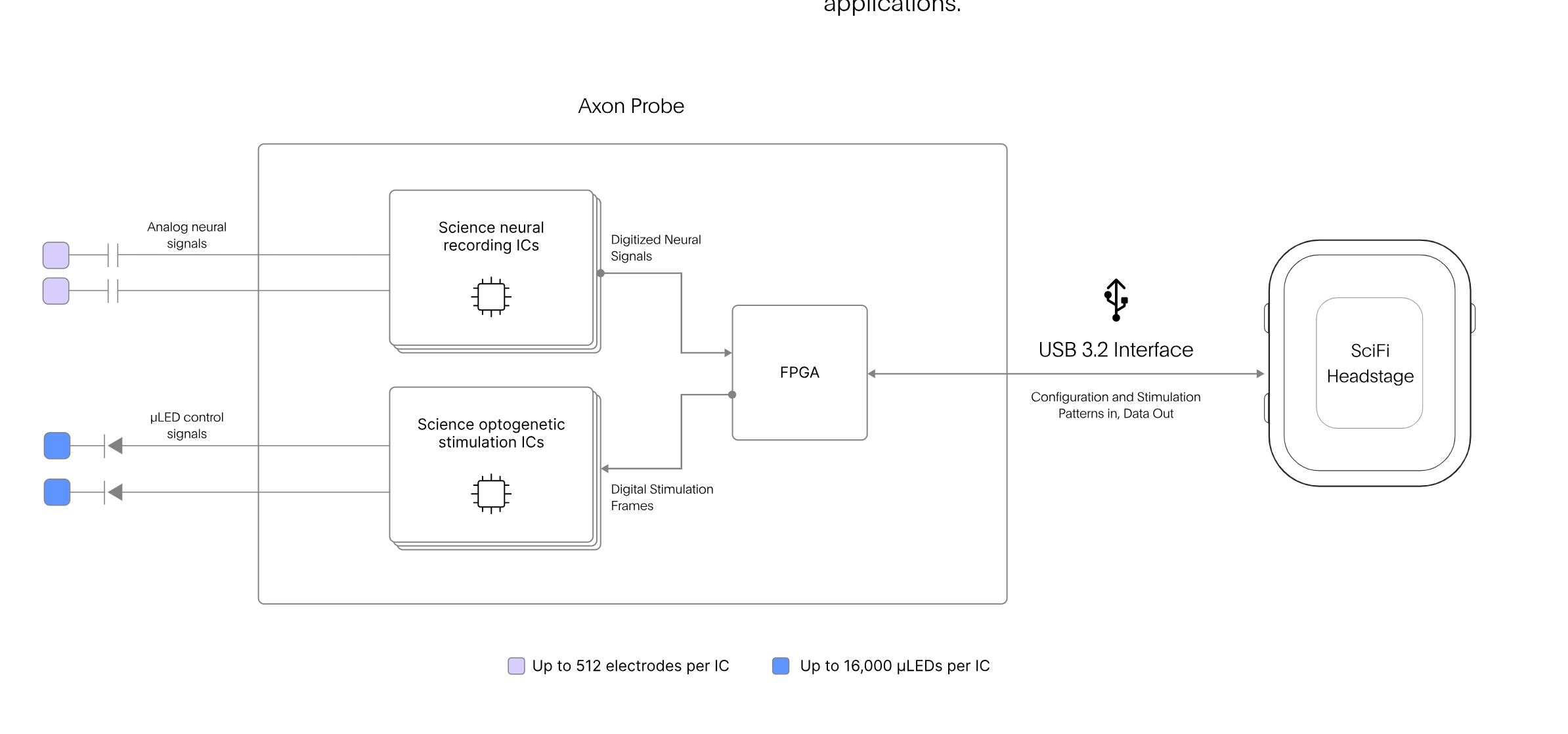
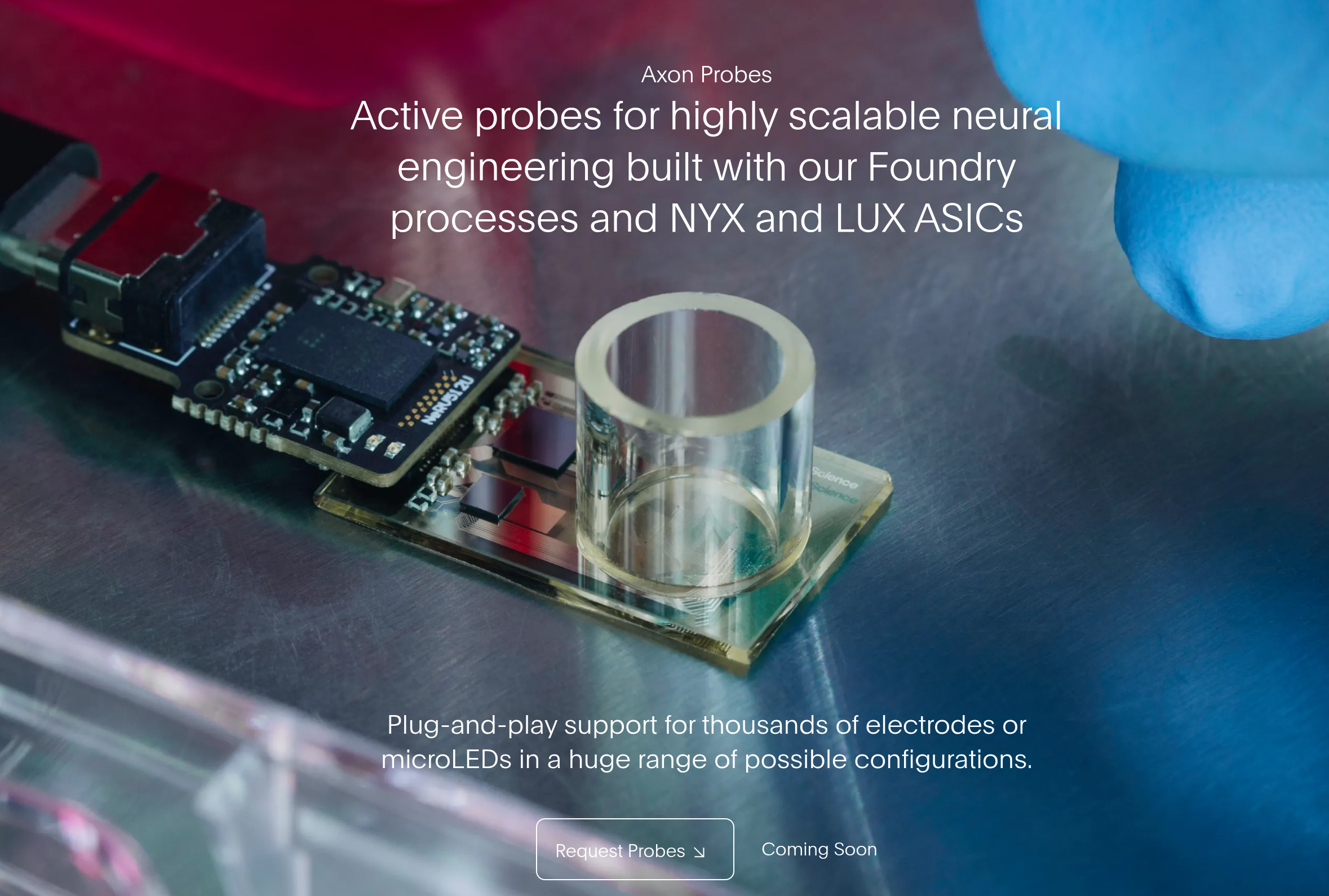
Science.xyz Axon Probe FPGA ?
2026-04-02 Thursday 🌐 🎬 💾 📚 📑 🔬
Exploring M5Stack Tab5 with MicroPython + LVGL
📑Exploring M5Stack Tab5 with MicroPython + LVGL
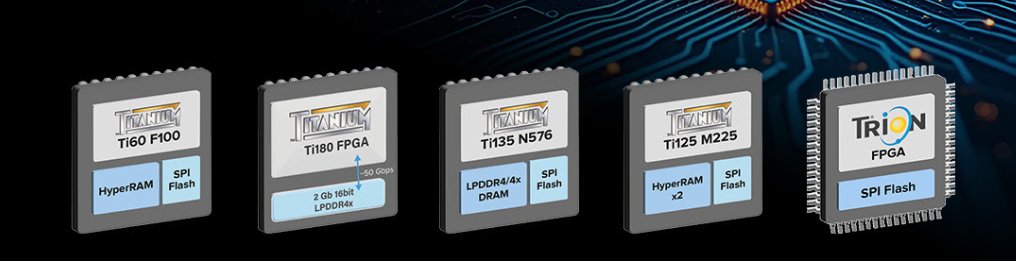
Efinix FPGA with Flash and DDR
2026-04-01 Wednesday 🌐 🎬 💾 📚 📑 🔬
MIPI DPHY
🌐Setting i.MX8M Mini and Nano MIPI-DPHY Clock
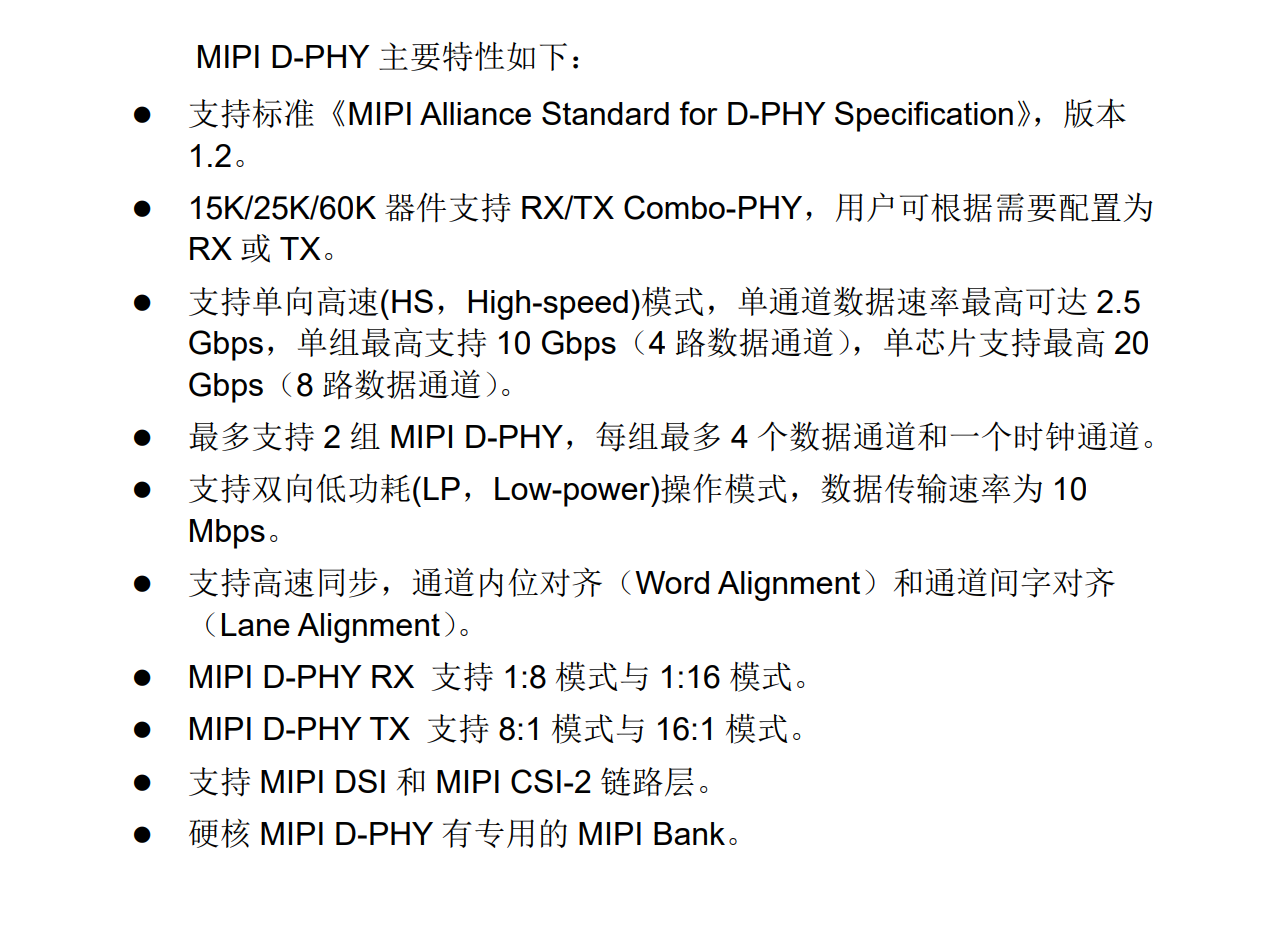
Clock 16:1
長大後 交朋友怎麽那麽難

2026-019
Concrete Labor -> Abstract Labor
Average Working Time
Socically Necessay Labor Time
Division of Labor